Facebook with Postey
How to Schedule Your Instagram Reels to Your Facebook Page Too, From One Draft
Your Reel goes to Facebook too,
from the same draft.
Say the point in your first sentence. it’s often all people see before See more
Try it free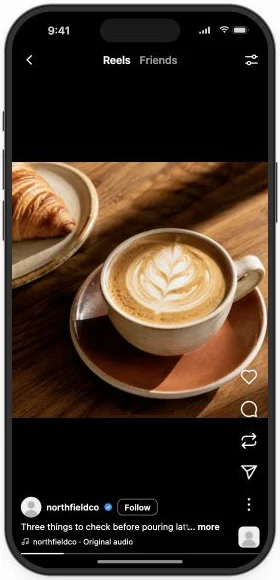
Three things I check before every pour. Save it for your next coffee.
Thu · 6:30 PM IST · both
Your latte art Reel is done and scheduled for Instagram. Your Facebook Page hasn’t had a post in weeks, and some of the people who follow it there don’t use Instagram at all. Meta’s own tools post to Instagram and Facebook, but not to TikTok or Shorts. In Postey, add Facebook to the same draft, give it its own caption, and it goes out at the same time as Instagram.
Add Facebook to your next Reel
- Connect your Facebook Page in Postey. You do this once.
- Open Create → Video and upload your Reel.
- Add Facebook from the row of networks and write its caption.
- Schedule it with the other apps, or give it its own time.
Make your point before “See more” cuts it off
Facebook shows only the opening of a Reel’s caption before See more. Put the point and the next step there, and cut anything that only makes sense on Instagram, like “link in bio”.
New video. Check it out.
Three things I check before every pour. Save it for your next coffee.
People on your Page know what they’ll get before they press play, and have a reason to come back to it.
Do it in one message. Add Postey to Claude or ChatGPT as a connector and sign in once, then paste this. Nothing goes out until you approve it. No AI assistant? The steps above do the same in the Postey app.
Using Postey, add my Facebook Page to this Reel’s draft and write its caption in my voice: [name the draft]. Put the main point in the first sentence, keep it under 400 characters, and remove anything that only makes sense on Instagram, like “link in bio”. Show me before you save it.
Keep your Page alive without a separate upload
Click Publish and every app you added goes out at the time you pick. Open Per-network times to give Facebook a slot of its own.
Put your next Reel on Facebook too. Try it free
Before you schedule it
- The point sits in the first sentence.
- The caption makes sense to someone who never opens Instagram.
- The first frame shows the finished pour.
- Any link opens on your phone.
Two mistakes worth avoiding
- Copying the Instagram caption. “Comment POUR” and “link in bio” mean nothing on a Page. Give Facebook its own words.
- Posting to the wrong Page. If you manage more than one, check the Page name and photo on the draft before you schedule.
The Reel is already made. Facebook costs you one click and one caption.